
As of October 2026, we are happy to report that PureVPN still works with Netflix.

Yep, PureVPN still works with Netflix USA.
If you're trying to figure out how to use a VPN to access Netflix or just an update on which VPNs still work with the streaming service, you've come to the right place.
Keep reading to find out everything you need to know.
Netflix Blocking VPN
Yes, Netflix does try to block VPNs.
The online streaming giant Netflix continues to do its utmost to block all VPN (virtual private network) and SmartDNS services. Both types of services are used to “spoof” your location and make you look like you are based someone else.
Netflix’ blockade of these services shattered the hopes of thousands of Netflix viewers who live outside the USA but use VPN (or SmartDNS) services to watch Netflix USA programming.
People do this because the Netflix USA catalog is bigger and better, having many more top-rated TV shows, movies and exclusive content.
There was a brief uprising by Netflix viewers against the move and more than 36,000 signed a petition in an attempt to compel Netflix to lift the ban. Alas, it was of no avail. The popular streaming company remained adamant and steadfast with its decision.
So, what’s a Netflix addict to do? The short answer: use PureVPN to access Netflix. We get into the details below.
'Best Netflix VPN' contents (select to expand)
How Region Locks Work and How to Bypass Them
When you’re trying to access one country's Netflix library from another country, your biggest obstacle is region locks. These are also called geo blocks or geo blocking.
Netflix and most other streaming services (and many websites) use your current location to determine the content that’s available to you. And plenty of them, including Netflix, won’t let you use their service at all if you’re not accessing it from the right place.
When this happens on Netflix, you'll get a dreaded error message like:
Whoops, something went wrong... You seem to be using an unblocker or proxy. Please turn off any of these services and try again.
How does Netflix Know Where you are Accessing It From?
OK, so now you know the problems that region locks can cause you, but how does Netflix figure out your location in the first place?
They do this by checking your IP address.
Your IP address is a unique set of numbers that’s tied to your computer or any other device connected to the Internet at any given time. It’s this IP address that gives away your location, because IP addresses are divided up and handed out by country.
So, if you’re in the US, your computer and devices use American IP addresses. And if you’re in Australia, it’s Australian IPs they use. And so on.
Tip: Use our handy tool to quickly answer what’s my IP address?
Of course, this is a major problem if you want to access content that’s only available in a certain region. Netflix won’t let you access the US version of their service with an Australian IP address, or for that matter any IP address designated outside the US.
And it's easy for websites to check which IP addresses are associated with which countries. This is how Google and Amazon both direct you to the country website you happen to be in.
You may have noticed this when traveling. For example, you tried accessing Amazon.com from an airport in London and instead were automatically sent to Amazon.co.uk. The same concept is at work for region locks and geo blocks.
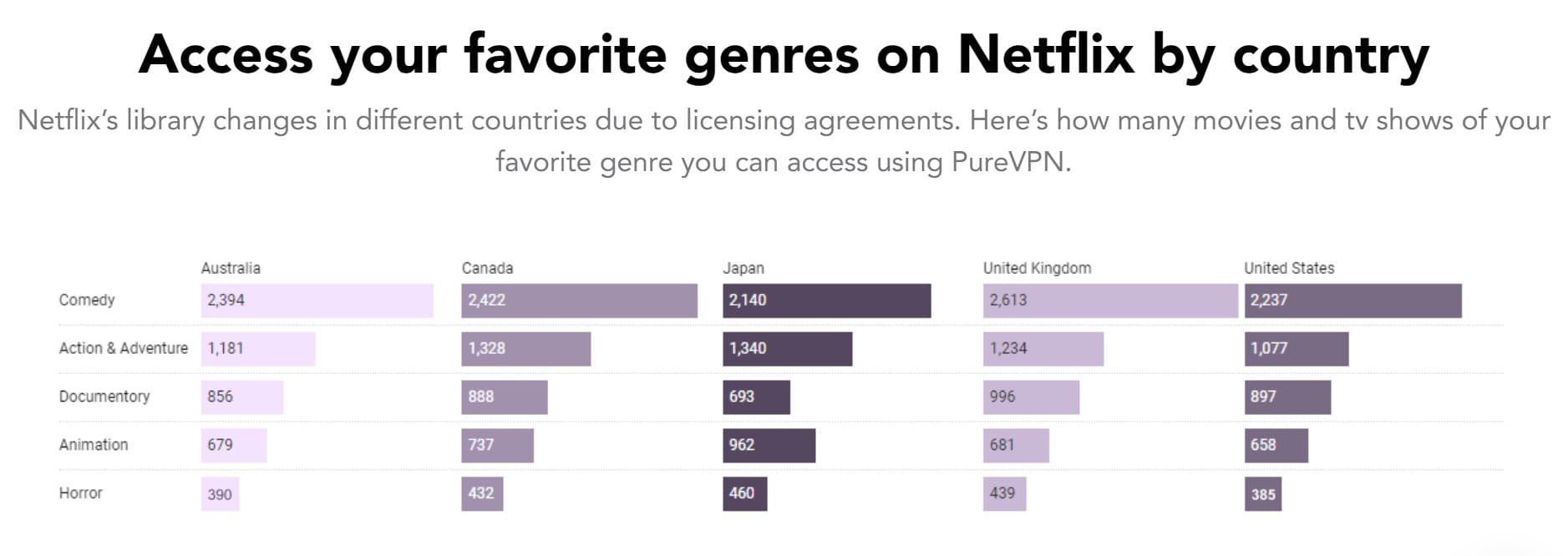
How the Netflix Library Differs by Country
Not only did Netflix get started in the US, the country produces a lot of the content that people want to watch, whether it's Hollywood movies or Netflix originals. So, for a long time, Netflix US had a much larger library of titles to choose from.
We're talking thousands more.
Fortunately, the gap has been narrowed over the years. For instance, Netflix US used to have nearly 3-times as many movies and TV shows as Netflix UK, but now their library size is nearly the same.
That being said, not all countries are as fortunate. Netflix US still has roughly 10% more movies than Australia and nearly 50% more than Germany.
And every country has slightly different selections of titles. If you're looking for a particular movie, you might find it on Netflix US and not Netflix India... or vice versa.
In fact, due to complicated licensing agreements, American users often don't have access to as many American programs as people in other countries!
But you're a paying customer. Why shouldn't you have access to all of the content Netflix has to offer? It's possible, and we'll show you how!
How to Beat Region Blocks to Watch Netflix USA
Fortunately, you can change your IP address with something called a VPN, which is short for virtual private network.
When using a VPN, your web traffic will be routed through a different IP address than the one you usually use. And the best part is, with a VPN you can choose the location of your IP address.
For example, you can use a US IP address from the UK. Many VPN services will even let you choose a specific city within the country you're connecting to!
PureVPN to the Rescue
To this day, almost all the prominent Netflix VPN providers have been shut out and blocked from providing access to multiple Netflix regions.
The ban covers both big and small VPN providers and those located in the USA or elsewhere. You can confirm this for yourself on Reddit's Netflix VPN subreddit.
If you are a Netflix aficionado, you may have lost all hope of ever accessing the larger, juicier Netflix USA TV show and movie catalog. Don't!
PureVPN is one of the few Netflix VPN providers that continues to work with Netflix USA.
31-day full money-back guarantee.
Using PureVPN to Access Netflix USA (and other Regions)
At this moment, PureVPN can provide you with an unprecedented level of access to Netflix content in the USA.
Accessing the Netflix USA catalog has remained the top most priority of thousands of Netflix viewers worldwide as it has the biggest database of content available throughout the globe, easily trumping a majority of other countries and regions.
But you can also use it to access Netflix for markets in the UK, Japan, Netherlands and Canada too, if you like (for example, if there is a show you really like that only airs in that region).
Steps for Using PureVPN to Access Netflix USA
If you want to access a Netflix region different from where you live (most people want to access Netflix USA), follow these steps:
1. Sign-up for PureVPN
Go to PureVPN and sign up. OK, that was easy. 🙂

2. Choose a PureVPN server location matching the region of the Netflix catalog you want to access
PureVPN has VPN servers in 70 countries, but most people will be interested in Netflix USA. This means you will want to use one of PureVPN’s US-based servers.
PureVPN specifies their Seattle, Phoenix, Salt Lake City, and Washington DC servers to use with Netflix US.
3. Subscribe to Netflix USA while PureVPN is connected to a US server
Continuing the example above, you simply:
- make sure PureVPN is connected to a server in the USA
- navigate to the Netflix USA website
- sign-up for Netflix.
Keep in mind that Netflix accepts PayPal as a payment method as long as it is available in your (spoofed!) region.
4. Always visit Netflix with PureVPN enabled for the matching region
Voila, you’re done!
Netflix USA’s full catalog is now available to you, no matter where you live or are travelling to.
Just make sure you connect to one of PureVPNs US-based servers whenever visiting Netflix.
Top Tip
PureVPN's blog also has a handy guide to watching Netflix, https://support.purevpn.com/how-to-watch-netflix-with-purevpn.
Take it One Month at a Time
PureVPN has avoided the fate of almost all VPN providers blocked by Netflix. And it has been doing so for a long time, so it's clear that PureVPN's techniques are working and that they know what they're doing!
And hopefully things stay that way.
But, there’s no guarantee it will, so it doesn’t hurt to hedge your bets and take a monthly package with PureVPN in case Netflix eventually catches up with this VPN provider too.
That said, PureVPN's longer-term discounts are tempting and totally worth it at a very affordable $2.08/month. That's especially true if you will use PureVPN for other activities whether to download torrents anonymously, be safe on Wi-Fi, protect against online tracking or any of the other estimated 36+ uses of a VPN.
All signups include a 31 day full money-back guarantee if you are not satisfied for any reason.
PureVPN has apps available for Windows, Mac, Android and iOS, so you can access Netflix USA on any device your heart desires.
Comes with a 31-day full money-back guarantee.
Experiencing Issues?
Should you encounter issues accessing Netflix with PureVPN, don't panic.
First, give the instructions on their page a look: https://support.purevpn.com/how-to-watch-netflix-with-purevpn
In the unlikely event that the advice there doesn't work, contact their support and their technicians will give you the latest information on how to access Netflix USA. Usually, it's simply a matter of joining a specific server in the US.
How to Use a VPN to Access Netflix: Wrap-up
Above, we walked you through the steps for accessing Netflix USA (or elsewhere) using PureVPN.
The key is that PureVPN still works with Netflix in October 2026, while almost all other VPNs don’t.
But when using PureVPN as your Netflix VPN, you might want to sign up for a month-to-month subscription in case it too gets the chop from Netflix.