Learning about Usenet connections and how many to use.
Whether you’re new to Usenet or a veteran, Usenet connections are one of those things that a lot of people don’t understand. What are they? And how many to use?
Don’t worry, because we’re here to demystify Usenet connections, once and for all.
What Are Usenet Connections (and How They Work)?
Usenet files are split up into lots of different, tiny parts. These are usually referred to as “articles”.
You download these parts individually, but once they’re all downloaded, your NZB downloader puts them all back together, almost like a digital puzzle. And boom, you have the correct, usable file.
- see Best NZB Sites
By the way, this is why Usnet files that fail to download properly will often refer to “missing articles”. It means many or most of the pieces are there, but some are not, leading to a file that can’t be properly put back together.
But where do Usenet connections come?
Basically, each connection carries one article at a time. The more connections you have, the more parts of a file you can download at a time. And theoretically, this will lead to a faster download of the complete file.
Though it’s not always that simple, as we’ll get to in the next section.
You can think of it almost like a container of water. If you poke one hole, the water will leak out at a set, limited rate. But poke five, twenty, or fifty holes, and the water leaks even faster. Each hole is still carrying the same amount of water, but the effect multiples with each new hole.
How Many Usenet Connections to Use?
So, again, with this logic in mind, it may seem natural to simply max out the number of connections. More connections, more articles, faster downloads, right?
Kind of… but not quite.
You see, unless you have the internet bandwidth to handle it, 50+ connections is overkill for most people. And in fact, rather than making your download speed faster, it could actually make it slower.
So, how many connections should you use? Well, there’s no one-size-fits-all answer. Rather, it’s better to do a little tinkering.
1. Consider your internet speed
First things first: how fast is your internet? 10 Mbps? 100 Mbps? 1 Gbps?
If you don’t already know, you can do a speed test to find out. The faster your connection, the more connections you can utilize.
Another thing to consider is whether you actually want to “saturate” your connection. Because if your Usenet downloads are using 100% of your bandwidth (or even close to that), this means you won’t have bandwidth for things like streaming or other downloads.
2. Experiment with your connections
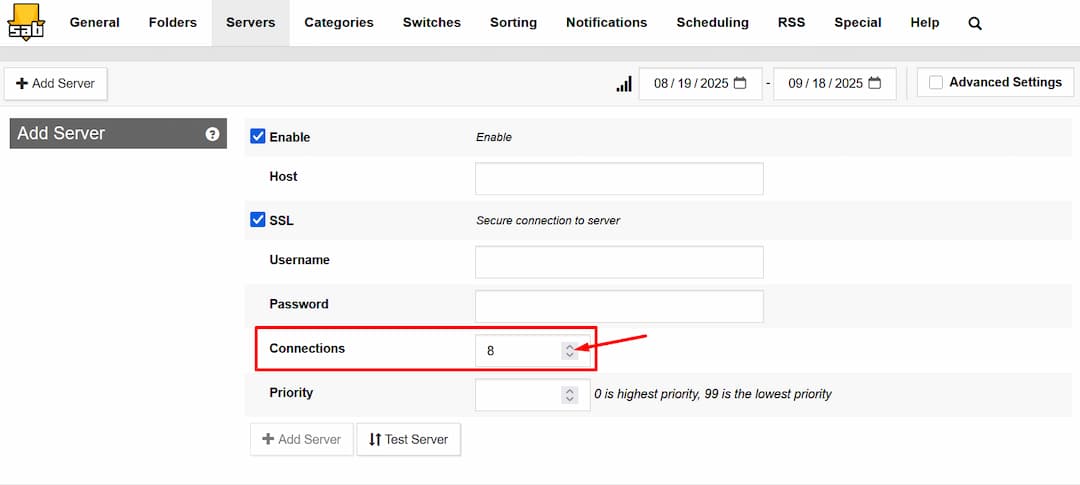
In SABnzbd, you can adjust the number of Usenet connections under Servers → Add Server.
Now, knowing your internet speed will give us a rough idea of the number of connections to use, but in the end, it all comes down to experimentation.
So, if your bandwidth is on the low end, start with a just a few connections, say, 3. Test it out. Is it as fast as you like? If not, increase the number of connections little by little until you get the download speeds you’re looking for. For example, 5 connections, then 7, then 10.
Once you hit your ideal download speed, you can even try removing connections.
If you have a higher bandwidth internet service, you can start with more connections from the beginning, and increase them a little more quickly. But the idea remains. Start low and add connections until you hit the correct download speed.
If you’ve experimented for a bit and still aren’t maxing out your bandwidth, there may be other issues. This troubleshooting guide for Sabnzbd is a good place to start.
Another thing worth noting is, if you have high-bandwidth internet, the device you’re using may not be able to get the most out of it. For instance, if your internet is 1 Gbps but you’re downloading on an old laptop, you may only get a few hundred Mbps.
Usenet Connections: Wrap-Up
Alright, so, now we know what Usenet connections are, what they do, and how many to use. Unfortunately, there’s no magic number that we can give you, but with a little trial and error, you’ll find the perfect number of Usenet connections for your setup in no time.
Still confused? Leave us your questions in the comments and we’ll do our best to answer them!
You might also like our guide on Best Usenet Providers to make sure your connection settings match your provider’s performance limits.