

Torrent encryption is a must if you want to protect yourself when downloading. But it can be a little confusing, if you’re just getting started.
That’s why we created this little guide, to show you how to encrypt your torrents. We’ll include both easy and slightly more complicated options.
[+] 'How to Encrypt Torrents' contents (select to expand)
The Easiest and Most Secure Way to Encrypt Your Torrent Traffic
While there are a couple different options for encrypting your torrent traffic, there is one choice that is clearly superior: and that’s a virtual private network, or VPN.
But what makes them so good? Let’s take a quick look:
- VPNs provide the strongest encryption, whether it’s the AES-256 encryption of OpenVPN or the new and faster Wireguard protocol.
- Unlike the other options, a VPN can encrypt your entire connection, not just your torrent traffic. But it can also be customized.
- The best VPNs contain a built-in kill switch, which will stop your torrent traffic if your encryption ever fails.
- A good VPN will only have a small effect, if any, on your torrenting speeds, since you won’t lose peers and your connection will only be slowed down by about 10 to 25%, depending on the provider and server you’re using.
- A VPN will also hide your IP address, making your torrenting activities even more secure.
- Last but not least, using a VPN is extremely easy and doesn’t require a lot of technical knowledge or setup. The top torrenting VPNs work right out of the box and will encrypt your traffic with the click of the mouse.
Our favorite VPN for encrypting torrents is PIA VPN. Not only does it provide all of the advantages listed above, it’s reliable, with a proven no-logs commitment.
Of course, one of the only drawbacks of VPNs is that the good ones cost money – and you shouldn’t trust the free ones. Fortunately, you can grab a membership to PIA VPN for as little as a couple bucks per month.
Benefits of Torrent Encryption
Not sure whether encrypting your torrents is worth it? Here are some of the biggest advantages:
- Encryption stops your ISP and nosy third parties from monitoring your torrent traffic
- This will also stop them from throttling your torrent traffic, since they won’t be able to determine what the traffic is
- With a VPN’s ability to hide your IP address, it will be very difficult to connect your torrenting activity to your real identity at all
Depending on the country you live in and what you’re downloading, encrypting your torrent traffic ranges from “no-brainer” to “absolute necessity”. For instance, torrenting in the United Kingdom or Germany without encrypting your traffic (and hiding your IP address) is a major no-no.
Other Options for Encrypting Torrents
If you’re completely opposed to using a VPN for whatever reason, there is another option: and that’s the free encryption offered by your torrent client.
However, this does have some major drawbacks:
- The encryption is much weaker than that provided by a VPN
- Only the traffic to and from the client will be encrypted; for instance, your ISP can still see the torrent trackers that you visit, and even any .torrent files that you download or magnet links that you click
- “Forcing” encryption will provide the best security, but it will also make you lose peers – and thus slow or even stall your torrent downloads
- This method is a little more complicated and less foolproof than a VPN
That being said, it can still be worth a try if it’s your only option.
How to Use Encryption with Your Torrent Client
The process for enabling encryption will vary a bit depending on which client you’re using, but there are generally three options:
- No encryption / unencrypted
- Optional / preferred encryption
- Required / forced encryption
Basically, optional encryption will only encrypt traffic when the peer allows it. This is less secure but helps you avoid losing peers (and thus download speed). On the other hand, requiring encryption is more secure, but it’ll cause you to lose peers that aren’t using encryption.
The encryption options are generally found under the torrent client’s Settings / Options menu, under the tab for Network, Connections, BitTorrent, or something similar.
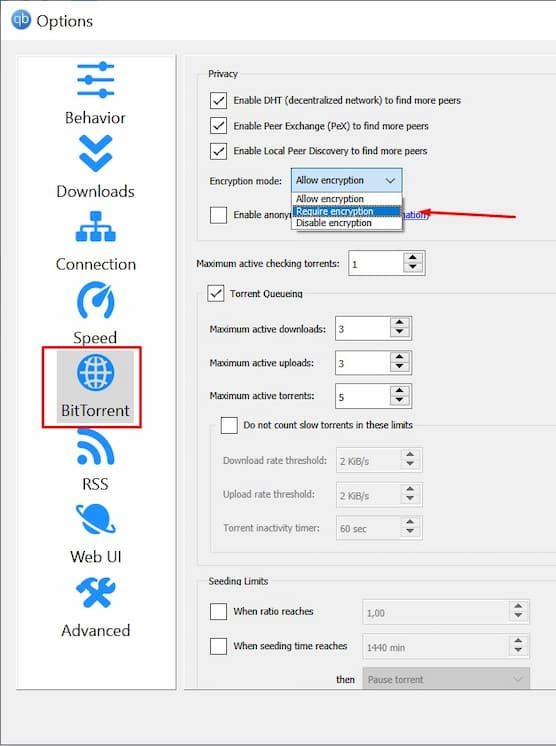
For example, in qBittorrent, simply go to Options → BitTorrent, then look for ‘Encryption Mode’.
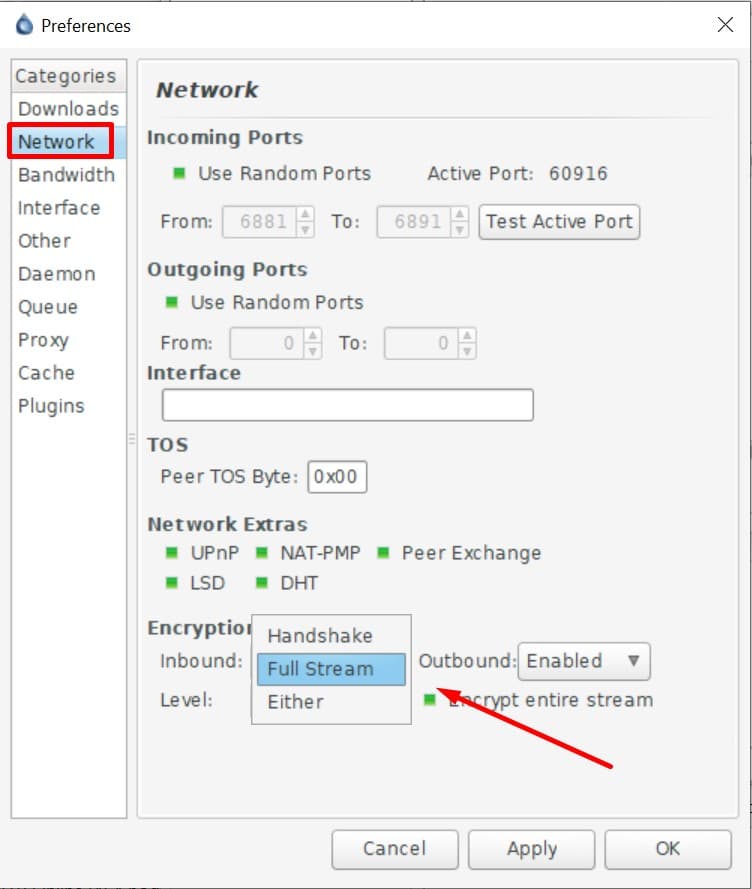
For Deluge, simply go to Edit → Preferences → Network and then set the Encryption Level. ‘Full Stream’ is the option you want for forcing encryption.
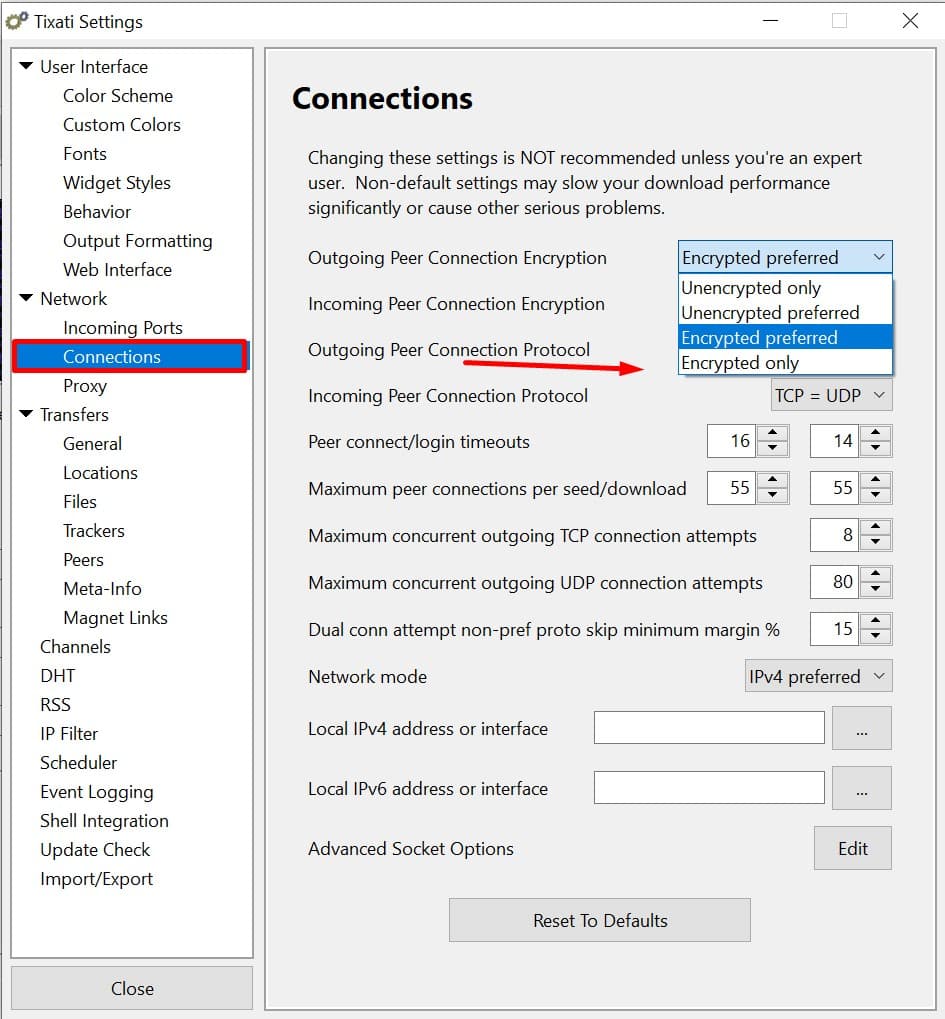
And for Tixati, the options are found under Settings → Network → Connections. Here you can set both incoming and outgoing encryption to ‘Encrypted Only’.
If you’re using uTorrent, go to Options → Preferences → BitTorrent and then change the ‘Protocol Encryption’ setting to Forced Encryption.
Torrent Encryption: Wrap-Up
There you have it, two options for encrypting your torrent traffic. For a combination of easy setup and excellent secure, we’d highlight recommend using a VPN.
But it is possible to add encryption to your torrent client itself, if you prefer. Just remember that it’ll be less secure and may cause your torrents to download slower.